
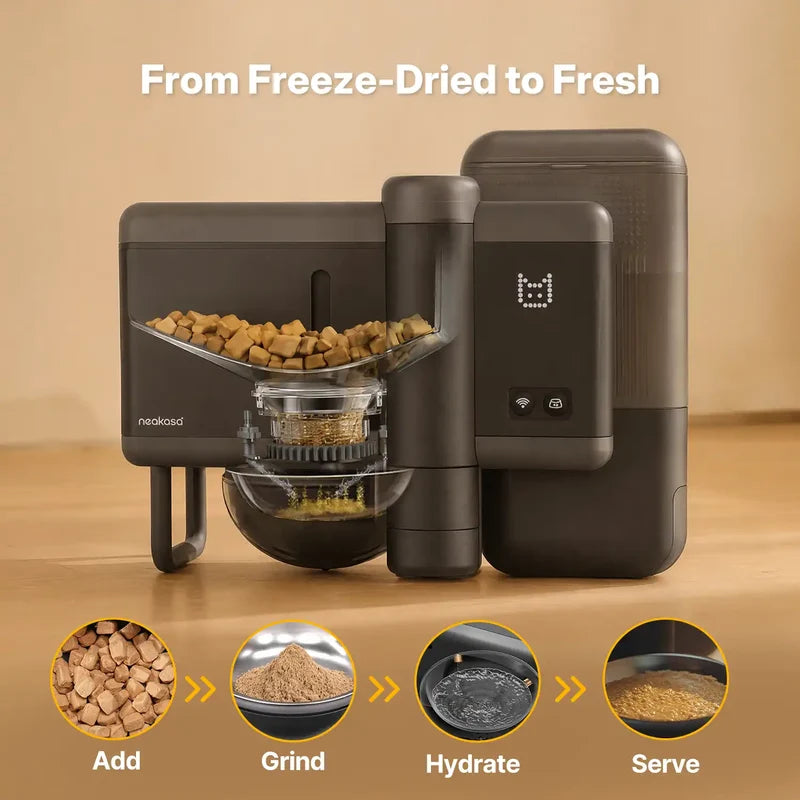
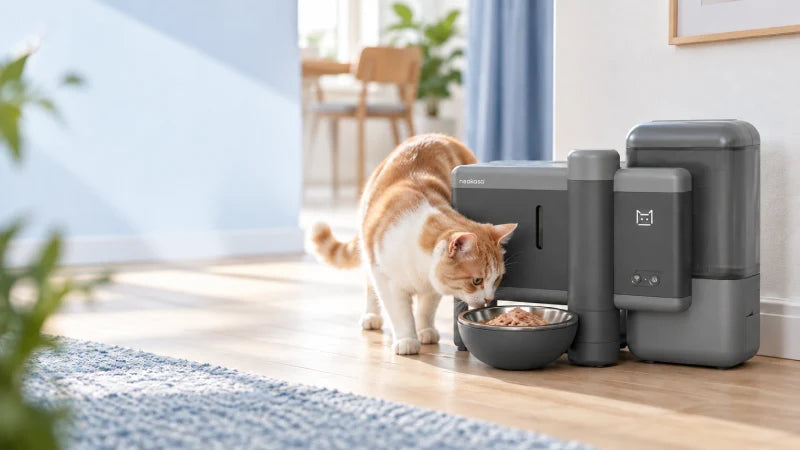
Your first few meals with Neakasa Riko are a chance to find out what works for your cat. This automatic pet feeder prepares rehydrated meals by combining dry food with water at feeding time. With three modes—Mix, Food Only and Water Only—you can choose what to serve and adjust the settings to suit your routine. This guide takes you through the initial setup, feeding options and everyday cleaning, so you can get comfortable using Riko before relying on it for meals while you’re out.
Quick Summary
- Freshly prepared meals: Riko combines compatible freeze-dried cat food with room-temperature water at feeding time, without heating or refrigeration.
- Three feeding modes: Choose Mix for food with added water, Food Only for food without added water, or Water Only to dispense water separately.
- Flexible meal settings: Adjust portions, water ratios and feeding times in the Neakasa App to suit your cat’s routine.
- A gradual introduction: Start with a small meal while you’re at home, then adjust the settings based on your cat’s response and any leftovers.
- Daily care still matters: Check food and water supplies, remove leftovers and clean the bowl regularly, even when meals are scheduled automatically.
Prepare Your Riko for First Use
Before using your Riko automatic pet feeder, clean the containers and bowl, install the desiccant, and add food and water. Here’s how to get everything ready.
Step 1: Wipe the Food Bin and Install the Desiccant
Wipe the inside of the food container with the supplied cleaning wipes. Fit the desiccant into its designated holder, keeping it separate from the food.


Step 2: Clean and Fill the Water Tank
Rinse the water tank with clean water, then fill it with fresh drinking water. Keep the water below the maximum fill line and close the lid securely.

Step 3: Clean and Replace the Food Bowl
Wash the food bowl with clean water and dry it thoroughly. Place it back into the bowl tray, making sure it sits correctly.

Step 4: Add Freeze-Dried Food
Add compatible freeze-dried cat food to the food container, then close the lid securely. Do not add canned, pouch or already-rehydrated food.
📋 A few things to check:
- Food size: Freeze-dried pieces should be no larger than 15 × 25 mm.
- Water level: Do not fill above the maximum water level mark.
- Water temperature: Use room-temperature drinking water for daily feeding. Never add water hotter than 60°C.
Next, connect the power, and Riko is ready to use. You can also use the Neakasa App to customise feeding times, portions and water-to-food ratios to suit your cat’s routine.

- Prepares fresh-made wet meals by grinding and rehydrating compatible freeze-dried food at mealtime.
- Customise meal texture with an adjustable 1:1–1:5 food-to-water ratio.
- Set food portions and schedule 20+ meals a day through the Neakasa App.
- Refill less often with a sealed 3 L food container and 2.4 L water tank.
A Quick Guide to Riko’s Feeding Modes
Riko offers three modes:
- Mix grinds freeze-dried food and adds water
- Food Only serves ground freeze-dried food without water
- Water Only dispenses water without grinding or dispensing food.
Choose a mode based on what you want to serve, then adjust the available settings in the Neakasa App.
| Setting | Mix | Food Only | Water Only |
|---|---|---|---|
| What it serves | Ground dry food with added water | Ground dry food without added water | Water only |
| Food portion | 3–15 g | 3–15 g | Not applicable |
| Water amount | 1–75 g, within the supported food-to-water ratio | Not applicable | 1–75 g |
| Food-to-water ratio | 1:1–1:5 | Not applicable | Not applicable |
| When to use it | Preparing a rehydrated meal | Serving compatible freeze-dried food dry | Dispensing a separate portion of water |
Mix
Mix mode prepares a rehydrated meal by grinding the selected portion of freeze-dried food and then adding water. You can adjust the food amount and hydration level to find a texture your cat accepts.
To set up a Mix meal:
- Select Mix in the app’s feeding settings.
- Set the food portion and water amount. Choose 3–15 g of food and a food-to-water ratio between 1:1 and 1:5, keeping the water amount within the supported range.
- Save or start the feed. Save the settings for your planned meal or start a feed using the available app controls.
- Check the result. For your first few meals, stay nearby to observe the texture and how much your cat eats.

For example, 10 g of freeze-dried food with 30 g of water gives a 1:3 food-to-water ratio. This is a settings example, not a recommended serving size for every cat. The food portion should fit your cat’s daily allowance, including anything served outside Riko.
Mix is useful when you want a rehydrated meal ready during the working day. Test the settings while you are at home first. If your cat leaves food behind, review the portion and texture before adding more meals to the schedule.
Food Only
Food Only mode grinds and dispenses freeze-dried food without adding water. The adjustable food portion remains 3–15 g, but there is no water amount or food-to-water ratio to set.
Select Food Only, choose the food portion, then save the setting or start the feed. Before confirming, check that the selected mode reads Food Only. Observe the first serving to confirm that food is dispensed without added water.

This option may suit a meal where you want to serve compatible freeze-dried food dry, provided its feeding instructions allow this. If the packaging requires rehydration, follow those instructions instead.
Food Only does not change which foods are compatible with Riko. It should not be treated as a setting for ordinary dry kibble, canned food or other unsuitable foods. Keep fresh drinking water available separately.
Water Only
Water Only dispenses 1–75 g of water, with no grinding and no food dispensing. It serves water as a separate portion; it does not prepare or rehydrate a freeze-dried meal.
To use it, select Water Only, set the water amount, and save or start the action. Check that the bowl is clean and free of leftover food before dispensing.

Use this mode when you want to offer water separately from a meal. The amount dispensed does not tell you how much your cat has drunk, so continue checking the bowl and keeping a reliable source of fresh drinking water available.
Choose and Switch Between Modes
Choose Mix for a rehydrated meal, Food Only for compatible freeze-dried food served without added water, or Water Only for water on its own.
When changing modes, review the food and water settings before saving. Check any upcoming feeding plans separately rather than assuming they have also changed. Clear leftovers and clean the bowl as needed, especially when switching from food to water. Observe the next serving to make sure it matches what you intended.
Adjust Portions, Water and Feeding Times
Once you have chosen a feeding mode, adjust the meal settings around your cat’s daily food allowance and preferred texture. Start with a small serving while you are at home, then use feeding records and any leftovers to guide changes.
Adjust the Meal Texture
In Mix mode, Riko supports a food-to-water ratio of 1:1 to 1:5. This means one part freeze-dried food to between one and five parts water.
For example, with a 10 g food portion:
| Food-to-water ratio | Freeze-dried food | Added water |
|---|---|---|
| 1:1 | 10 g | 10 g |
| 1:3 | 10 g | 30 g |
| 1:5 | 10 g | 50 g |
Less water produces a thicker meal, while more water creates a looser consistency. The result also depends on the freeze-dried recipe, so follow the food manufacturer’s preparation instructions and check the finished meal.
Keep the food portion the same while testing different water amounts. This makes it easier to see which texture your cat prefers without changing the amount of food offered. These examples explain the settings; they are not recommended serving sizes for every cat.
Build and Review a Feeding Schedule
Start with your cat’s total daily food allowance, including meals and treats served separately, then divide the amount assigned to Riko across your chosen feeding times.
Riko supports 20+ scheduled meals a day, giving you flexibility to arrange smaller portions throughout the day. You do not need to use every available meal slot. Choose a schedule that fits your cat’s eating habits and your household routine.
After saving a schedule, check:
- Feeding times: Are meals set for the intended times?
- Portions: Do the food amounts add up to the planned daily allowance?
- Modes: Is each meal using the intended feeding mode?
- Water settings: Are the amounts suitable for your chosen Mix meals?
- Status: Are the plans you want to use enabled?
Observe the first scheduled meals while you are at home. If food is regularly left in the bowl, review the portions and spacing between meals before adding more feeds.
Read Feeding Records and Alerts
Your settings show what you asked Riko to serve. Dispensing records show what the feeder reports delivering, while eating records help you review your cat’s use of the bowl. A scheduled portion should not automatically be treated as food eaten.
Look for patterns across several meals. Does your cat regularly leave part of a serving? Are certain feeding times more successful than others? Use these observations to make a small adjustment to the next plan, then check the result.
When an alert appears, read the reason before starting another feed. A skipped meal may be linked to food already in the bowl.
Manage Leftovers with Freshness Settings
Freshness Settings helps manage food left in the bowl between meals. The feature is off by default, so we recommend enabling it and reviewing the leftover threshold as part of your initial setup.
The default threshold is 20 g, and you can adjust it or switch the feature on and off. When enabled, Riko responds as follows:
| When Riko checks | Condition | What Riko does |
|---|---|---|
| Before a scheduled feed | Leftovers exceed the set threshold | Skips that feed and reports a feeding failure due to excess leftovers |
| 1 hour after serving | Leftovers still exceed the threshold | Automatically adds 10 g of water |
| 4 hours after serving | Leftovers still exceed the threshold | Retracts the bowl to prevent further access to the remaining food |

Check the Reason for a Skipped Meal
If a feeding plan is skipped because leftovers exceed the threshold, check the bowl and the app message before dispensing more food. Clear away remaining food as needed, then review whether the next portion or feeding time needs adjusting.
Understand the Automatic Water Top-Up
After one hour, the additional 10 g of water helps moisten food that has started to dry out. The bowl’s retraction and extension may also draw your cat’s attention back to the meal.
Adding water does not make old food fresh again or replace the need to remove leftovers and clean the bowl.
Clear the Bowl After Retraction
Four hours after serving, if the food remaining in the bowl exceeds the set threshold, Riko automatically retracts the bowl to prevent your cat from eating food that may have spoiled.
Press and hold the feeding button for 3 seconds to extend the bowl, then start a manual feed.
Until the bowl is cleaned, Riko will continue checking the amount of leftover food before each scheduled meal to determine whether to proceed with feeding.
Daily Care and Maintenance for Your Riko
Riko takes care of scheduled feeding, but checking supplies, cleaning the bowl and keeping an eye on your cat remain part of the daily routine. A few regular checks help keep your automatic pet feeder ready for use.
Check Food, Water and Leftovers
Check the food container, water tank and bowl regularly. Even when supplies are plentiful, look for damp food, unusual smells or residue, and replace anything that appears contaminated.
The Neakasa App alerts you when food or water is running low. Use these reminders alongside your own checks, particularly before leaving home. You can also record how long the desiccant has been in use and set a replacement reminder in the app.

Remove leftover meals promptly rather than allowing new portions to build up on top of old food.
Clean the Bowl and Food Contact Areas
Clean the food bowl every day, removing any remaining food before washing it. Dry the bowl and place it securely back in the tray.
Clean the water tank and food container regularly, following the user manual for removal, washing and reassembly. Check accessible food-contact areas for residue, and make sure the food container is completely dry before refilling it with freeze-dried food.
Follow the manual’s guidance on which parts can be washed. Do not rinse or immerse the main unit.
FAQs About Riko Automatic Wet Food Feeder
Why won’t Riko connect to Wi-Fi?
Check that your phone is connected to a 2.4 GHz Wi-Fi network and that the password is correct. Before pairing, enable Bluetooth and location services; iOS users also need Precise Location enabled. Missing permissions may trigger an error message. Keep your phone and Riko near the router during setup.
What should I do if the rehydrated food’s texture isn’t right?
First, check that you are using compatible freeze-dried food and following its preparation instructions. Review the food portion and added water amount. Keep the food portion unchanged while adjusting the water, then observe the next meal. Change one setting at a time to find a texture your cat accepts.
Can Riko dispense food or water separately?
Yes. Riko offers Food Only and Water Only modes. Food Only grinds and dispenses 3–15 g of compatible freeze-dried food without adding water. Water Only dispenses 1–75 g of water without grinding or dispensing food. Select your preferred mode and adjust the portion in the Neakasa App.
Will Riko keep working without Wi-Fi?
Yes. If Wi-Fi disconnects, Riko continues feeding according to its previously saved schedule, provided it has power and sufficient supplies. App data will not update in real time while the feeder is offline. Remote commands and schedule changes require a connection, so check connectivity before making adjustments.
Make Everyday Feeding Easier
With the right mode, portions and schedule, the Neakasa Riko automatic wet food feeder can make freshly prepared meals part of your cat’s daily routine. Start with a small serving, adjust the texture to your cat’s preference and enable Freshness Settings to help manage leftovers. Regular bowl cleaning and daily checks will help keep each meal on track.

Leave a comment
All comments are moderated before being published.
This site is protected by hCaptcha and the hCaptcha Privacy Policy and Terms of Service apply.